Distributing a survey using a QR code
Copying a link into an email or online platform is straightforward, but sometimes you will want staff, parents or pupils to take a survey at an event or when they are around the school environment. A QR code helps to make this straightforward.
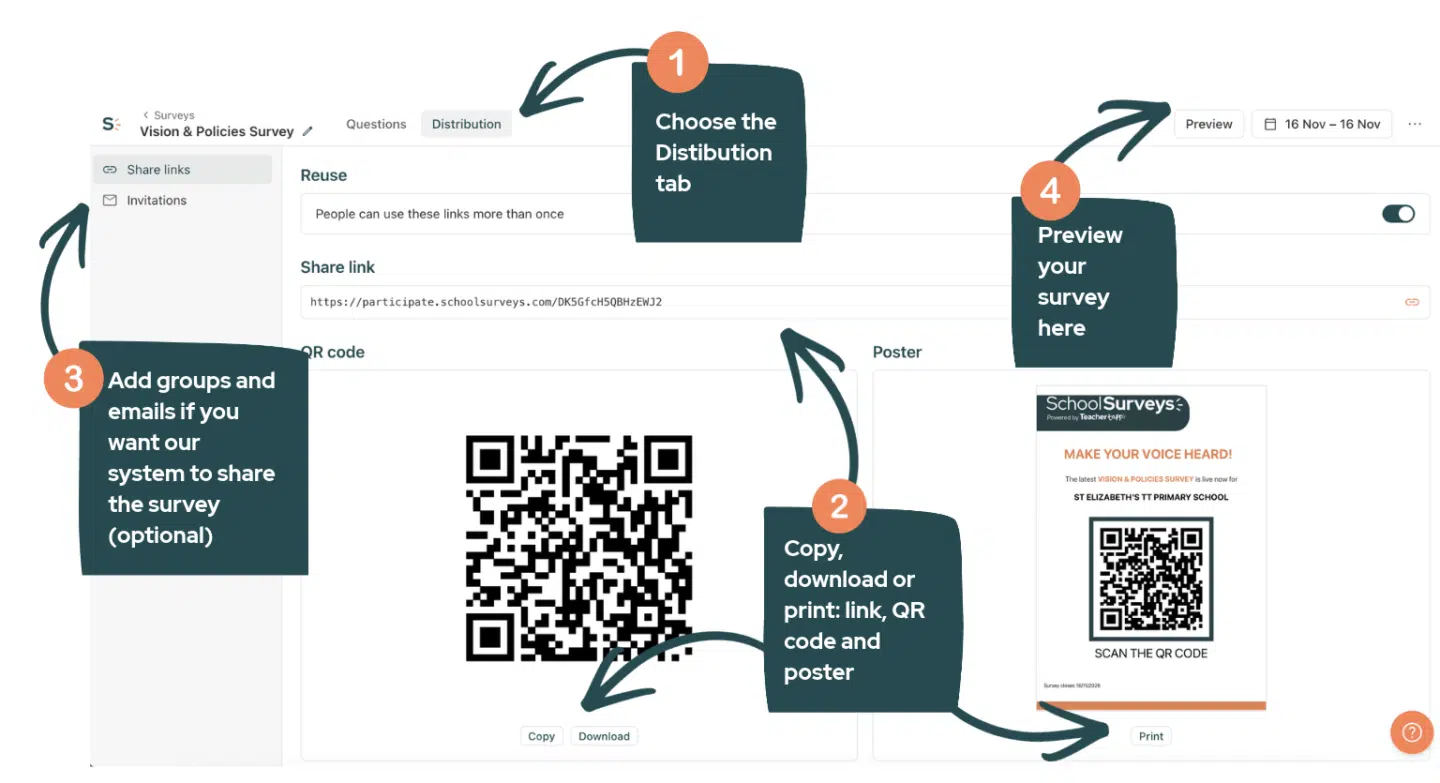
Ensure you have prepared and scheduled your survey on the School Surveys portal
Log in to the School Surveys portal. Choose the survey you want to share from your survey list.
Navigate to the Distribution tab at the top. From here, you can download the sharing link, QR code and poster, and/or you can enter email addresses into the portal and our system will send invitations when the survey opens and reminders to complete before it closes.
During staff meetings
- Include a QR code in any presentation slide used in staff meetings for easy access. Show it before you begin or during a break.
- If staff have a smartphone or tablet handy, they can simply use their device’s camera to scan the QR code. Most modern devices will display a link that the QR code directs to. Staff can then tap on this link to open the survey instantly.
During parents’ evenings
- Get the QR code linked to the parent survey you want parents to fill out. You can copy it or download it from the Survey Summary page.
- During a parents’ evening, make sure to display the QR code prominently – parents can easily scan it with their phones. Alternatively, provide computers with the survey link already open in a web browser.
- Emphasise to parents that this is completely anonymous – neither school staff or anyone from School Surveys can find out who submitted a particular response.
- Depending on your arrangements, you can display the code alongside refreshments, project it on a screen in a hall, or have it on printed sheets around the school or at the gate.
- Encourage parents to complete the survey before meeting with their child’s teacher – ask teachers to encourage parents to complete it before they leave.
Surveying pupils
- Get the QR code linked to the pupil survey you want pupils to fill out. You can copy it or download it as detailed above.
- Emphasise to pupils that this is completely anonymous – neither school staff or anyone from School Surveys can find out who submitted a particular response.
- Pupils could access the QR code in various ways:
- In a secondary school, via printed posters in areas where pupils with smartphones can see them before or after school – consider your school’s policy on device access when choosing locations.
- In a primary setting, the code could be displayed on a screen for a class to access using tablet devices during a lesson.
Don’t forget
You don’t have to use a QR code – you can also copy the survey’s direct web link from the Distribution tab too. This can be shared via other closed platforms, such as an MIS dashboard for parents and pupils, a school communications platform, or in an email to the relevant stakeholders.
If you still need help, please get in touch at help@schoolsurveys.com, call us on 0330 043 4469 or book a call for a time that suits you, and our team will be more than happy to help.